Should Every Mobile App Have AI?
Not every mobile app needs AI. Priya Gaudani shares a practical framework for deciding when it improves the user experience—and when traditional engineering is the better choice.
• 7 min read
Not every mobile app needs AI. Priya Gaudani shares a practical framework for deciding when it improves the user experience—and when traditional engineering is the better choice.
Start with the user problem.
AI is everywhere in software development right now. Mobile platforms are making it easier to add generative AI, on-device models, multimodal experiences, and even agent-like capabilities. But as a mobile developer, I think there is a more important question than “Where can we add AI?”: “Does this problem actually need AI?”
My answer is simple: no, not every mobile app should have AI. AI is valuable when it makes a user experience meaningfully better. If it is only being added because competitors have an AI button, it can easily become more complexity without more value.
Imagine a fitness app. A competitor launches an AI chatbot, so the team decides to add one too. Users can now ask questions such as “What workout should I do today?” But if the app already has well-designed workout plans, progress tracking, and a clear training flow, a generic chatbot may not solve anything important.
A better use of AI would be to understand the user’s workout history, goals, recovery patterns, and preferences, then suggest a relevant session. The difference is small in implementation philosophy but huge in product thinking: the first approach adds AI; the second solves a user problem.
This is what I call the AI checkbox problem: competitor adds AI → team feels pressure to follow → chatbot gets added → no clear problem is solved → the feature becomes expensive to maintain.
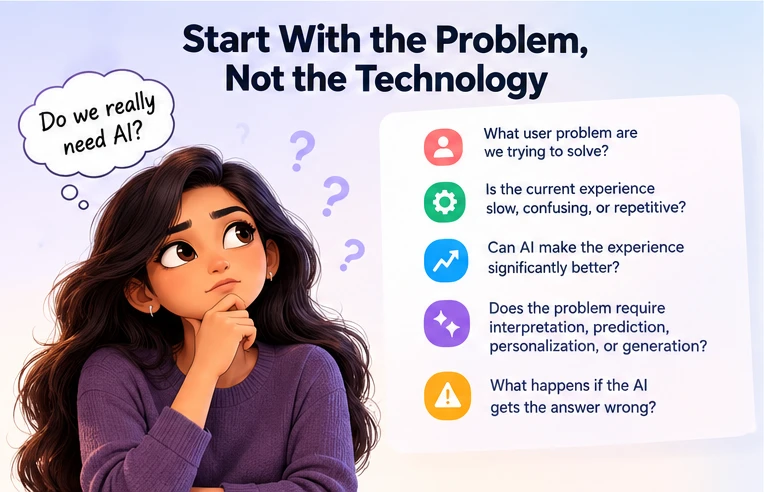
Before choosing a model or API, I would ask a few basic questions:
This keeps the discussion focused on user value instead of technology trends.
These are areas where traditional rules often become difficult to maintain because the input is not perfectly structured.
Consider OTP validation. There is no reason to send an OTP to an AI model and ask whether it is valid. The rule is deterministic: compare the received code with the expected code and check its expiration.
The same principle applies to form validation, calculations, sorting, authentication, permissions, navigation, and many business rules. Traditional code is usually faster, cheaper, more predictable, and easier to test.
My rule of thumb is: if I can clearly define the rule in code, I probably don’t need AI to make the decision.
AI should be treated as another component of the application, not as the architecture itself. A clean mobile app can still have presentation, domain/application logic, data access, networking, caching, analytics, and security layers. AI becomes one capability inside that structure.
The exact implementation depends on the product, but keeping AI behind a clear application boundary makes it easier to change models, providers, prompts, or routing logic later.
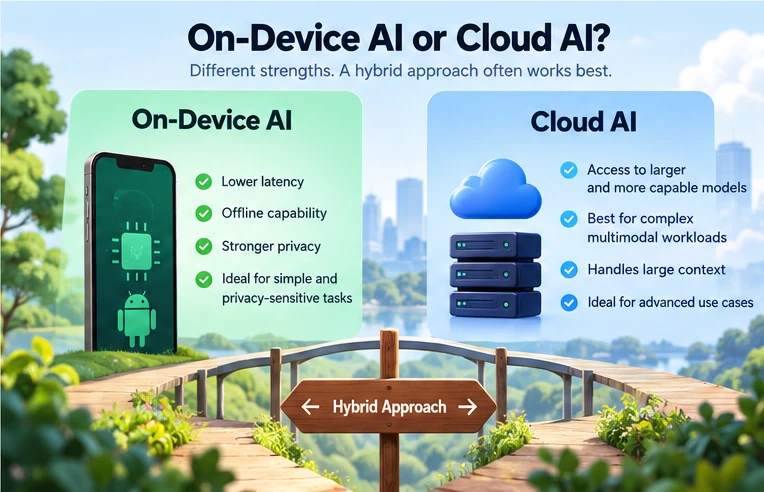
This is one of the biggest architectural decisions. On-device AI can provide lower latency, offline capability, and stronger privacy because processing can happen locally. On Android, Google provides on-device generative AI capabilities through ML Kit GenAI APIs on supported devices; availability depends on the API, device, and model.
Cloud AI provides access to larger and more capable models and is often a better fit for complex multimodal or large-context workloads. Firebase AI Logic also supports cloud and hybrid inference for Android. Check the current platform requirements and release status: hybrid inference is experimental, and the ML Kit Prompt API it uses is in beta at the time of editing.
In real products, I think hybrid architecture is often the most practical: use the device when the task is suitable for local processing, and use the cloud when the task genuinely needs more capability.
Mobile apps can contain extremely personal information: photos, messages, location, contacts, documents, voice, health information, and financial data. Adding AI means deciding what information the model is allowed to see.
Before sending data to a model, I would ask: Does the model actually need this data? Can the task be performed locally? Can the input be minimized or anonymized? How long is the data retained?
AI architecture is therefore also a data-access decision. The more data an AI feature can access, the more carefully that access needs to be designed and protected.
Traditional features often have a simple relationship: input → expected output. AI features are different. The same input may produce slightly different outputs, and the output can be useful without being identical every time.
Testing therefore needs to cover accuracy, hallucinations, unexpected inputs, privacy, prompt-injection risks, network failures, latency, model changes, and failure or fallback behavior.
Instead of testing only for one exact sentence, I would define what the output must satisfy: required information, allowed boundaries, safety constraints, and acceptable behavior.
There is an important difference between “Here are three flight options that match your preferences” and “I booked your flight.” The second action has financial and potentially irreversible consequences.
For important actions, I prefer an experience such as: Review → Edit → Confirm → Act. AI can do much of the difficult work, while the user keeps control over the final decision.
When deciding whether to introduce AI, I would use this sequence:
The key question is not “Where can we add AI?” It is “Where can we make the user’s experience meaningfully better?”
No. But every mobile team should at least consider whether AI can solve a meaningful problem.
AI is a strong fit for natural-language experiences, personalization, recommendations, image and voice understanding, summarization, automation, complex search, and other problems involving unstructured information.
It is not automatically a good fit for simple validation, deterministic business rules, calculations, straightforward workflows, or features where traditional engineering already provides the best user experience.
AI is a powerful tool, but it is still a tool. As mobile developers, our job is not to use the newest technology everywhere. Our job is to understand the problem, choose the right technology, build it responsibly, and make sure the user is actually better off.
“AI shouldn’t be added because an app can use it. It should be added because the user is better off because of it.”
Get expert guidance on implementing AI solutions that actually work. Our team will help you design, build, and deploy custom automation tailored to your business needs.

Discover how AI automation development is transforming businesses—improving efficiency, reducing costs, and driving growth across manufacturing, healthcare, finance, and retail.

An AI agent that works in a demo and an AI agent that works in production are different systems. This guide covers what actually breaks — compounding step failure, tool design, silent partial success, unbounded loops, context growth — and the evaluation and guardrail work that separates the two.

Discover how AI automation is transforming law offices—from document review and legal research to client intake, billing, and compliance—so legal teams can focus on what matters most.